AI Rendering for Kitchen & Bath Designers
A kitchen or bathroom order is one of the few decisions in a home that cannot be undone once it is placed — cabinets are cut, tile is set, the vanity is installed. The designer's real job is getting the client to approve that order with confidence, and a board of separate swatches never shows how the cabinet door, the counter and the tile will actually look together in their own room. Archome turns the site photo into that combined picture — the same kitchen or bathroom, restyled with the exact finishes being specified — in about 30 seconds.
The problem
The expensive moment in this job is the order, not the design. Once cabinets are cut to size and tile is set in mortar, a client who says "it is not what I pictured" becomes a return-policy problem, not a quick fix. Swatches and moodboards leave that gap open because they never show the finishes combined, in the client's actual room.
Generic AI makeover apps make the gap worse: they hand back a different kitchen — a shifted cabinet run, a window that moved, a layout that is not the one being quoted. A client comparing that image to their own room loses confidence in the whole presentation, not just the picture.
Archome keeps the room the room. The cabinet run, the window and the camera angle come from your photo and stay fixed; only the cabinet fronts, counters, backsplash, flooring and fixtures change to match the brief. What the client approves is the room they are about to order, restyled — not a stranger's kitchen.
What comes back
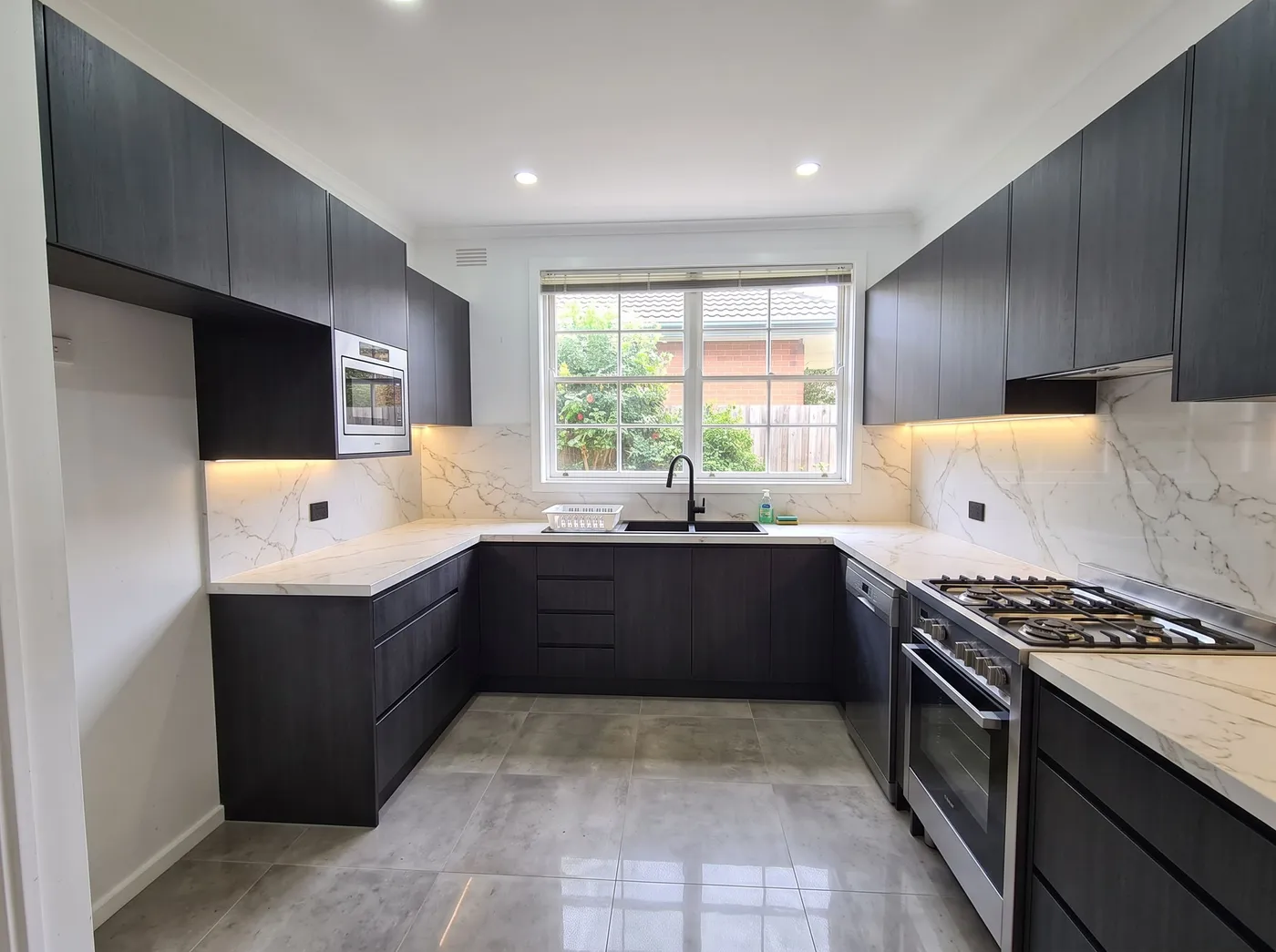
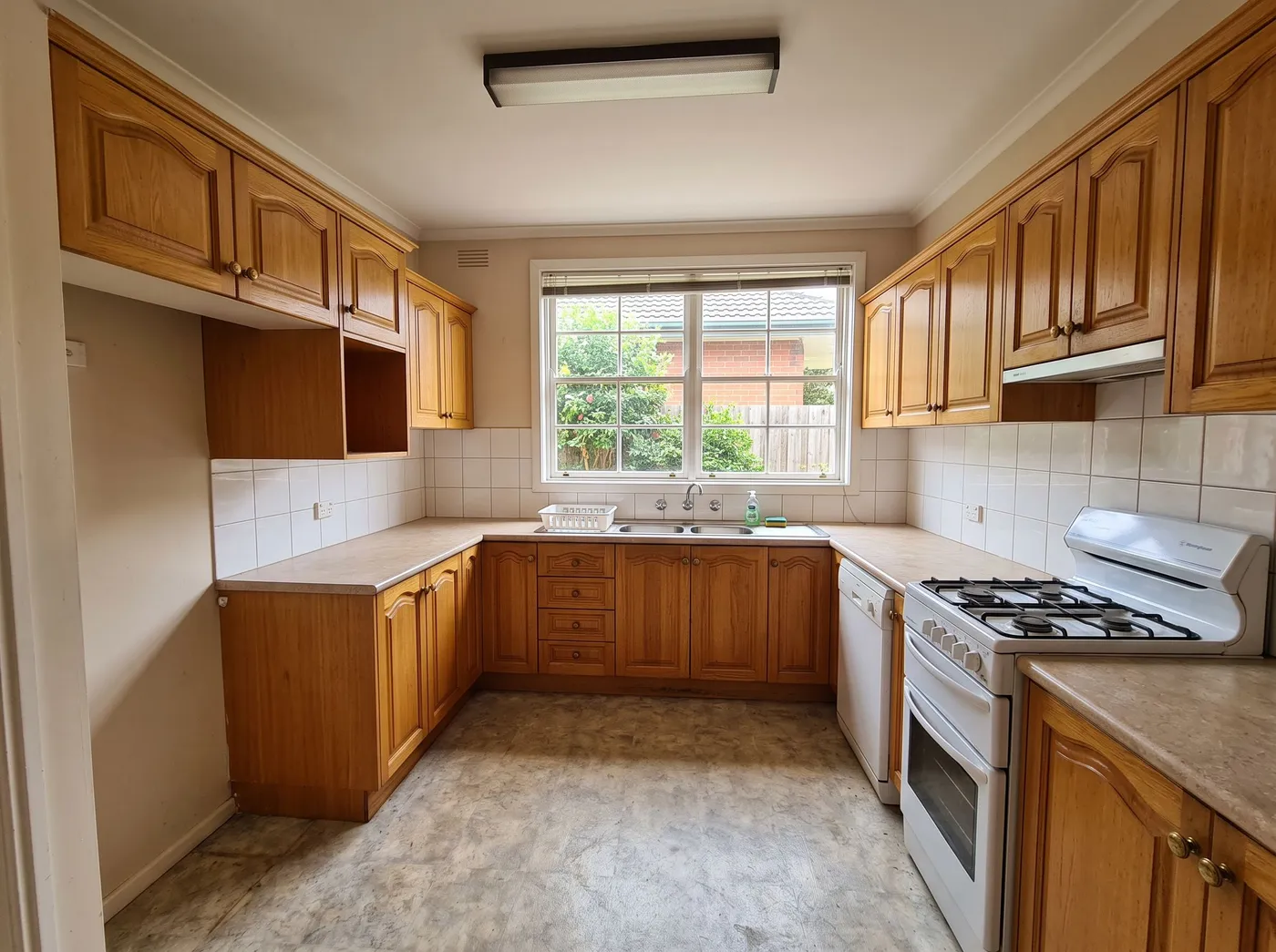
Kitchen before, remodeled — the before photo is an AI-generated sample, not a client home. Drag the handle to compare.
What it costs
| Quality | Credits per image | Cost on the $29 plan | Time |
|---|---|---|---|
| Fast | 10 | $0.29 | About 30 seconds |
| Ultra | 30 | $0.87 | Longer — heavier engine |
Prices exclude tax. A new account starts with 100 credits — three renders — with no card. Plans and credit packs.
How kitchen & bath designers use Archome
1. Photograph the existing room
One phone photo of the kitchen or bathroom as it stands — from the doorway or a corner, lights on. No measuring, no CAD.
2. Specify the finish direction
Kitchen Remodel AI and Bathroom Remodel AI run on Interior AI with the room type already set — describe the cabinet style, counter material, tile and fixtures in plain words, or start from a preset. To test one finish on its own, just the counter or just the floor tile, Material Swap changes that surface and leaves the rest of the frame untouched.
3. Present the set, confirm the order
Three directions is a full presentation and takes a couple of minutes of render time. Upscale the finish the client signs off on to 4K for the order sheet or the showroom folder.
What you get
- Purpose-built kitchen and bathroom remodel tools, not a generic room restyle
- Room layout, windows and camera held fixed — the client sees their own room
- Material Swap tests one finish (just the counter, just the tile) without re-rendering the room
- 4K upscale for printed spec sheets and showroom presentations
- Full commercial licence on paid plans
- Runs in the browser — show the client a direction during the same appointment
Honest limits: this is not a kitchen or bathroom planner — there are no cut lists, no appliance clearances and no measured cabinet runs, so your design or showroom software still produces the order itself. The model re-rolls rather than edits a delivered image, so when a client wants one change — the same kitchen with a different handle or floor — re-render just that detail with Material Swap or Inpainting rather than the whole room, or the second image will quietly shift other things too. And check every result against the original photo before it goes near an order: layout is held, but exact dimensions are not guaranteed, only guided by what the camera showed.
Start here
Compare us honestly
Choosing between tools? We keep honest side-by-sides — including when a competitor is the better fit: vs Veras, vs Gendo, vs D5 Render — or the full comparison index.
Questions professionals ask
Will the kitchen or bathroom still look like my client's actual room?
Yes — layout, windows and camera stay fixed on every render; only the finishes you specify change. Put the before and after side by side before presenting; that match is what makes the image usable in a sign-off meeting.
How do I show one finish option at a time?
Use Material Swap on just the surface in question — the counter, the floor tile, the cabinet front. It changes that one finish and leaves the rest of the room exactly as it was, which is a cleaner comparison than two full renders.
What does one client presentation cost?
Three kitchen directions plus three bathroom directions is six renders — 60 credits on Fast, about $1.74 on the $29 Lite plan. Running the same set on Ultra (180 credits) is roughly $5.
Can I use the renders in a client proposal or showroom marketing?
Yes, on any paid plan — full commercial licence, no watermark. The free tier (100 credits, no card) is for evaluating the tool on a real room first; it covers three renders.
Can this replace my cabinet or kitchen-planning software?
No. It produces a photoreal concept to get the finishes approved — no cut lists, clearances or measured drawings. Your planning software still produces the order itself.
Test it on a real project.
100 credits when you sign up — three renders on the free tier. No card required.
Start free →