
AI for Kitchen & Bath Designers
· 7 min read
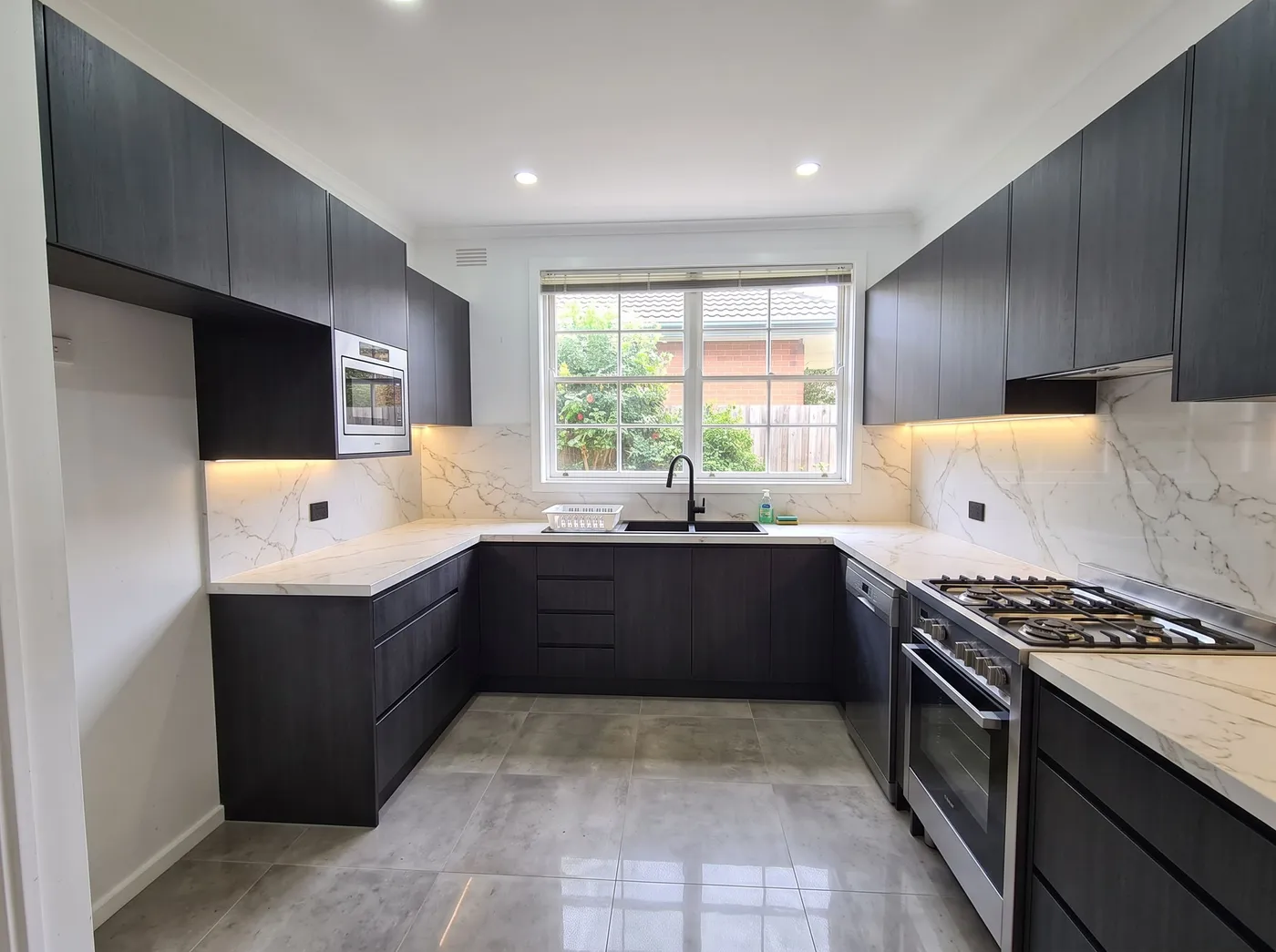
Every kitchen and bath designer knows the moment that decides whether a project closes cleanly: the client has to approve a cabinet door, a counter material and a tile all at once, from separate samples on a table, then sign an order that cannot be undone once cabinets are cut and tile is set. AI rendering for kitchen and bath designers exists to close that gap — not with a generic room picture, but with the client's own kitchen or bathroom, restyled with the finishes actually being specified, in about 30 seconds.
The problem isn't that clients can't picture one material on its own. It's that nobody can mentally combine three of them and trust the combination reads the way it did separately. Moodboards are honest about each finish alone and silent about how they sit together in an actual room, under actual light. That silence is where a signed order turns into a change request.
Generic AI "redesign my room" apps make this worse: ask one to show a kitchen in a new finish and it often hands back a different kitchen — a shifted cabinet run, a window a foot to the left. Kitchen Remodel AI and its bathroom counterpart are built around the opposite constraint: the room in the photo stays the room in the result. Layout, windows and camera come from your upload and don't move; only cabinet fronts, counters, backsplash, flooring and fixtures change to match the brief.
What changes, and what stays fixed
Both tools run on the same engine as Archome's general Interior AI, with the room type already set, so there's no setup before the first useful image. A written brief — "sage green shaker cabinets, white quartz, brass hardware, warm pendant lighting" — or a style preset produces a finished concept in about 30 seconds. A client comparing the result to their own kitchen should recognize it immediately, because it is their kitchen, finished differently.
Not every decision needs a full re-render. When the only open question is one surface — quartz or soapstone, a larger or smaller tile — re-rendering the whole room for each option adds noise, since lighting shifts slightly between generations even on an identical brief. Material Swap solves the narrower problem: it changes one surface and leaves the rest of the frame as it was, so two options are a true side-by-side rather than two pictures the client has to reconcile by eye.
From photo to a signed order
- Photograph the room as it stands. One phone photo from the doorway or a corner, lights on — no measuring, no CAD.
- Specify the direction. Describe cabinet style, counter, tile and fixtures in plain language, or start from a preset. A single-surface question goes to Material Swap, not a full re-render.
- Present a short set. Three directions is a real presentation, and it takes minutes of render time rather than days of modelling.
- Lock the winner and upscale. A 4K upscale produces the version for the order sheet or showroom folder — sharp enough to print.
This isn't a kitchen-planning suite. There's no cut list, clearance check or quote — that still belongs to whatever software produces the order. What it closes is the earlier, narrower gap: getting the client to a confident yes on the combination of finishes before that order is drawn up.
Handling revisions without confusing the client
The model re-rolls a result rather than editing it in place. If a client says "same kitchen, different handle" after seeing a full render, re-generating the whole room from that note can shift small things too — a shadow, a hint of counter pattern — and now two images don't quite match for reasons that have nothing to do with the handle. Treat the change as what it is: a single-surface swap in Material Swap, or a small region fix with Inpainting. Save the full re-render for when the direction itself has genuinely changed, and check a result against the original photo before it reaches a client — layout is held fixed, but exact measurements are guided, not verified.
What one presentation actually costs
A typical pitch — three kitchen directions, three bathroom directions — is six renders. At 10 credits each on Fast, that's 60 credits, about $1.74 on the $29 Lite plan; the same set on Ultra (30 credits each) runs roughly $5. A new account starts with a one-time 100-credit trial, no card required — three renders, enough to run an actual client room through it.
Frequently asked
Will the room still look like my client's actual kitchen or bathroom? Yes — layout, windows and camera stay fixed; only the finishes change. Put the before and after side by side before presenting.
Can I use these renders in a client proposal or showroom marketing? Yes, on any paid plan — full commercial licence, no watermark. The free tier is for evaluating the tool on a real room first.
Does this replace my kitchen-planning or cabinet software? No. It produces a photoreal concept to get finishes approved — no cut lists, clearances or measured drawings. The planning software still produces the order; this gets the client to a confident yes first.
Try it before the next order goes in. Open Kitchen Remodel AI or Bathroom Remodel AI and upload a real room — the first three renders are free, no card required.