
Remove furniture from a photo with AI
Brush over the sofa, the bed or the clutter, type "remove the sofa", and only that area is rebuilt as the floor and walls around it. Free to try, no credit card.
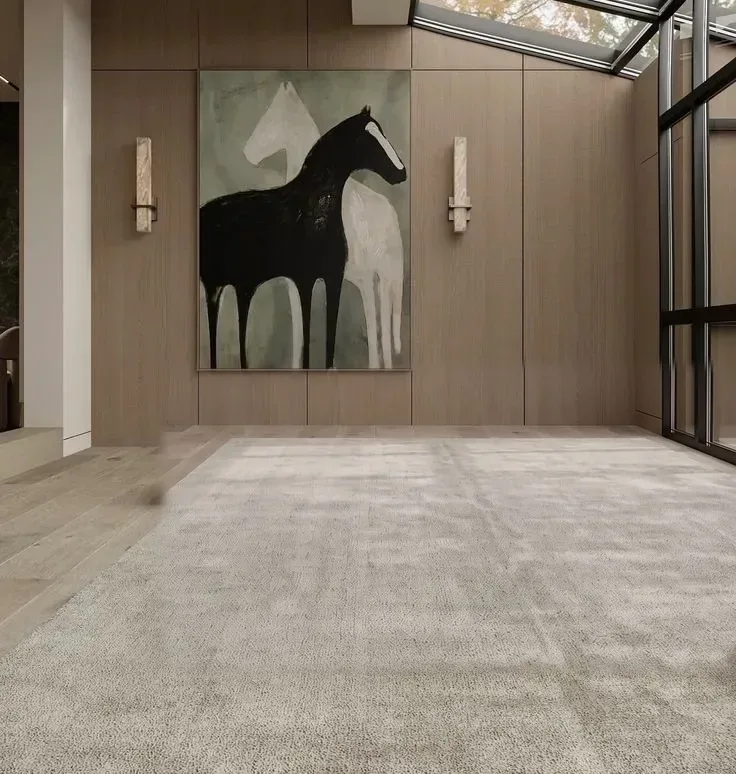
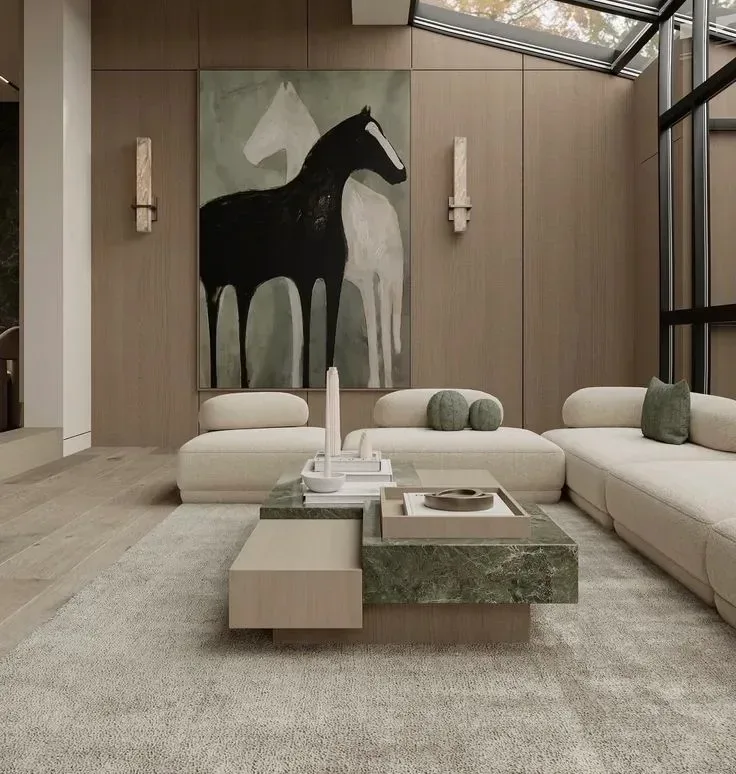
Free to try · plans from $29/mo · See plans
- Only the brushed area changes
- Commercial licence on paid plans
- Label edited listing photos
Clear a listing photo without re-shooting it
An occupied home photographs smaller than it is. The tenant's sofa, a pile of boxes or a dated rug pull the buyer's eye away from the room itself. This editor lets you take those items out of the photo you already have: paint over what should go, type what to remove — "remove the sofa and the boxes" — and only the painted area is rebuilt, continuing the floor, rug and walls around it. Nothing new is added.
It is the same brush-and-describe engine as the [AI render editor](/tools/inpainting), framed for listing photos. Everything you do not paint stays as it was, so the windows, the light and the camera angle of the original shot are kept.
How it works
- 1
Upload the listing photo
Any JPG or PNG, straight from a phone or a camera. The editor opens with your photo on the canvas.
- 2
Brush over what should go
Brush over the whole object with a little margin — legs, cushions and the shadow under it included. Anything left outside the brush stays in the photo. Leave walls, windows and built-ins unpainted.
- 3
Say what to remove
"Remove the sofa and the coffee table." The brushed area is rebuilt as the floor and walls around it, and you can run another pass for the next item.
Who it's for
- —Agents listing an occupied home before the tenant moves out
- —Real estate photographers delivering a decluttered set from the same shoot
- —Landlords refreshing a rental listing between tenants
- —Owners selling without an agent who cannot empty the house for photos
What it removes well — and where it needs more than one pass
Single pieces of furniture, a bed with its bench, a sofa with its coffee table, rugs, boxes, bins, toys and small decor come out cleanly when the brush covers the whole object with a little margin.
A fully furnished room is a different job. There is no one-click "empty the whole room" button here: you clear it a few pieces at a time, and very large painted areas give softer results than small ones. If the goal is a furnished-but-different room rather than an empty one, it is usually faster to restage the photo with virtual staging or redesign it with Interior AI.
Disclosure: removing furniture is still a modified photo
Most MLS boards treat any digitally altered listing photo the same way: label it. A one-line caption such as "Furniture digitally removed" covers it; keep the unedited original on file. Check your own board's photo rules for the exact wording.
Never paint over permanent features, damage or anything a buyer would expect to see in person — radiators, stains, cracks, built-in fixtures. Removing movable furniture is presentation; removing defects is misrepresentation.
Removing furniture from a photo: the options
| Approach | What you need | Time | Best for |
|---|---|---|---|
| This AI editor | The photo, a brush and a short description | Seconds per pass, in the browser | Taking out a few items, clutter or a rug |
| Re-shoot the room | An empty house and the photographer back on site | Days | When the room will be emptied anyway |
| Manual retouching (Photoshop) | Editing skill or a paid editing service | Minutes to hours per photo | Pixel-level control on a single hero image |
Frequently asked
Can I remove all the furniture from a room in one click?+
No. This editor works on the area you paint, so you remove items a few at a time. A fully furnished room usually takes several passes, and very large painted areas give softer results than small ones.
Does the rest of the photo change?+
No. Only the painted area is regenerated; walls, windows, light and camera angle outside your brush stay as they were in the original.
What should I type?+
Say what to remove: "remove the sofa", "remove the boxes and the rug". The area is filled with the floor and walls around it — a rug under the furniture is kept unless you name it. Brush over the whole object with a little margin; a part left outside the brush stays in the photo.
Is it free?+
Yes, to start. A new account gets a one-time 100-credit trial with no credit card, which covers three edits. After that, credits come from a paid plan or a one-time credit pack.
Can I use the edited photos in my listing?+
Yes. Paid plans include a commercial licence. As with any altered listing photo, label it as digitally edited and keep the original on file.
Can I add new furniture after clearing the room?+
Yes — clear the room here, then stage the cleared photo with virtual staging. Each step uses its own credits.