AI Virtual Staging for Real Estate Agents
Empty rooms sell slower and dated rooms sell cheaper. Archome turns one listing photo into a staged, refreshed or renovated version in about 30 seconds — same room, same windows, same proportions, so what the buyer sees is what the property actually is.
The problem
Physical staging costs thousands per listing and takes days you may not have before photos are due. Traditional virtual staging services are cheaper but still run on turnaround queues and per-photo invoices.
Generic AI tools invent a different room — and a listing image that misrepresents the property is worse than an empty one.
Archome keeps the architecture fixed: staging fills the real room with furniture, the renovation view re-materials the real kitchen, and the before/after pair actually matches. That is what keeps the image honest enough for a listing.
The arithmetic is the part most agents have never done. Physical staging is commonly quoted at $500-2,000 a month per home; human virtual staging services publish $16-60 per photo with a 4-48 hour queue. On the $29 plan a staged photo here costs $0.29 at Fast quality and $0.87 at Ultra, and comes back in about 30 seconds. A ten-photo listing is a rounding error instead of a line item.
The other cost is the one nobody invoices: the listing that sat empty because the photos went up unstaged while the stager was booked. Turnaround is not a convenience feature in this business, it is the whole thing.
What comes back
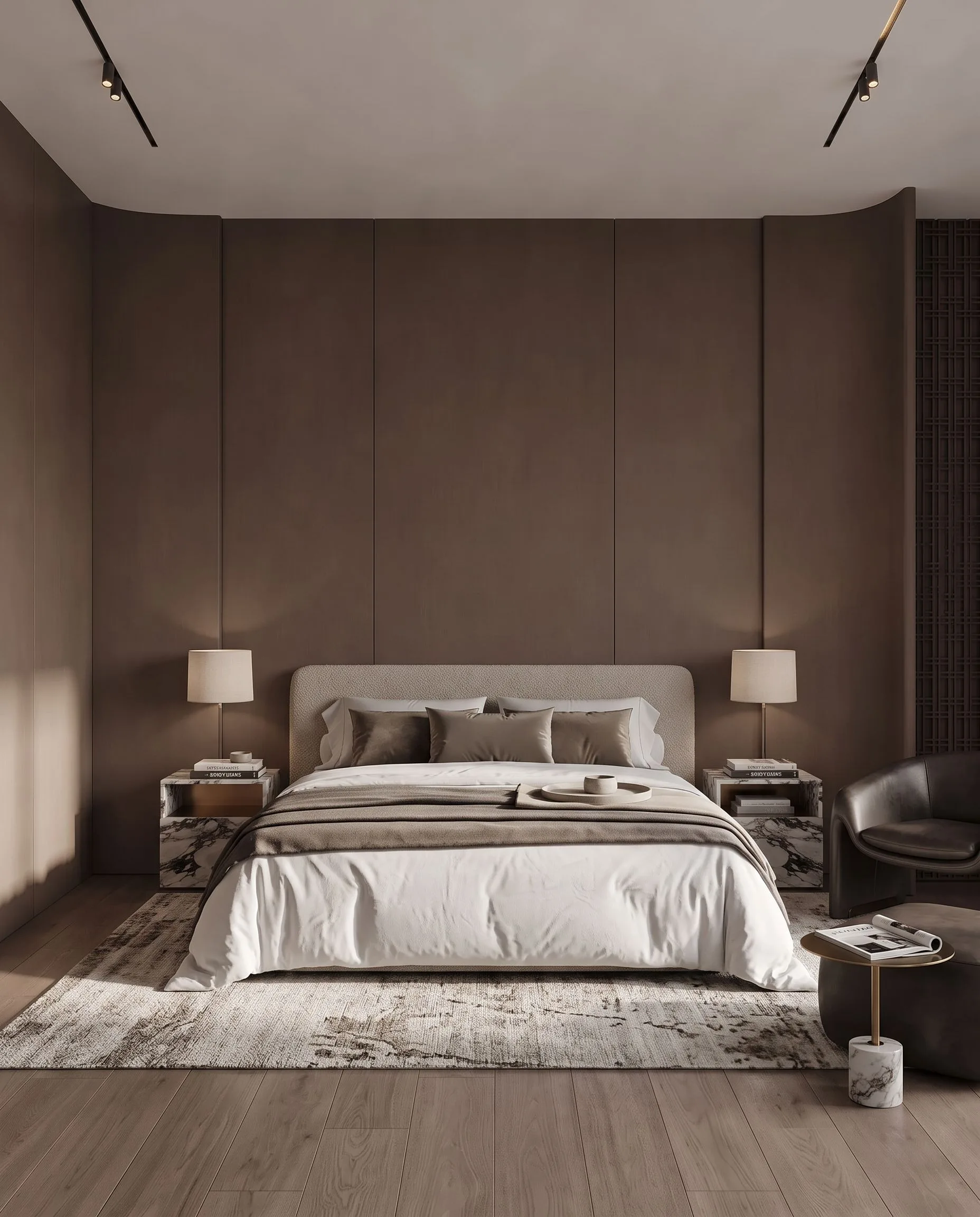
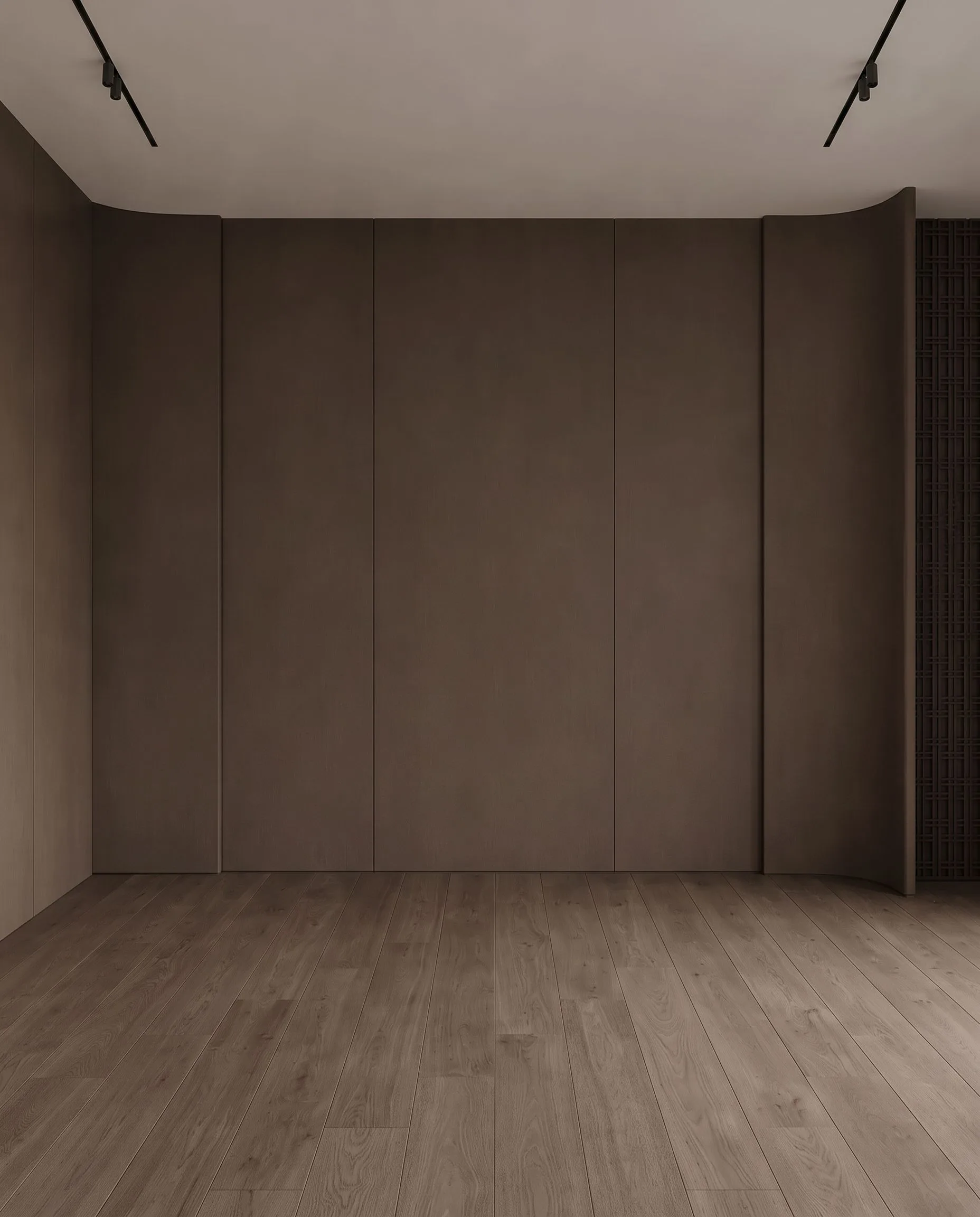
An empty bedroom, virtually staged. Drag the handle to compare.
What it costs
| Quality | Credits per image | Cost on the $29 plan | Time |
|---|---|---|---|
| Fast | 10 | $0.29 | About 30 seconds |
| Ultra | 30 | $0.87 | Longer — heavier engine |
Prices exclude tax. A new account starts with 100 credits — three renders — with no card. Plans and credit packs.
How real estate professionals use Archome
1. Shoot once, upload once
The listing photos you already have are the input — no measuring, no modelling.
2. Pick the play
Virtual staging for empty rooms; interior refresh for tired ones; exterior/curb-appeal pass for the facade; renovation visualisation for fixer-uppers.
3. Publish the pair
Export print-ready with 4K upscaling, and show before/after in the listing. A short video clip of the hero space is one more click.
What you get
- Room geometry held fixed — the staged image matches the walkthrough
- Staging, refresh, curb appeal and renovation views from one account
- 4K upscaling for print and portal hero images
- Full commercial licence on paid plans
- Per-listing economics: one $15 credit pack covers a typical listing set
- About 30 seconds per image at Fast quality — no queue, no ticket, no next-business-day
- Re-run a photo as often as your credits allow, in as many styles as you want
- Clear an occupied room first, then stage it — removal and staging run on the same balance
- Have the floor plan? Draw or upload it in the Plan & Render editor, lay out the furniture on the plan and render that view for the brochure
Honest limits: staged furniture is illustrative, not a purchasable inventory list, and renovation views are visual studies, not scoped construction advice. Disclose virtual staging where your market requires it — honesty also happens to be what keeps buyers trusting the listing.
Start here
Compare us honestly
Choosing between tools? We keep honest side-by-sides — including when a competitor is the better fit: vs BoxBrownie, vs Virtual Staging AI, vs Styldod, vs ApplyDesign — or the full comparison index.
Questions professionals ask
Will the staged photo still match the real property?
Yes — walls, windows, openings and camera are locked; only furnishing, materials and light change. That is the difference from generic AI images and the reason the before/after pair holds up at the viewing.
What does it cost per listing?
A $15 one-time credit pack (500 credits) covers a typical listing set — roughly 16 Ultra-quality images or a mix with video. Subscriptions from $29/month suit agents staging continuously.
Can I use the images commercially on portals?
Yes on any paid plan: exports carry a full commercial licence. The free tier is for evaluation and personal use.
Do I need design skills?
No — style presets cover the common looks (modern, scandinavian, warm minimal), and one-line prompts refine them. If you can describe the buyer, you can stage for them.
How fast is it?
About 30 seconds per image at Fast quality; Ultra takes longer because it runs a heavier engine. There is no queue and no ticket — you can stage a full listing set from the car outside the property. Human staging services publish 4 to 48 hour turnarounds for the same work.
Do I have to disclose that a photo is virtually staged?
In most US markets yes, and it is good practice everywhere. Photo policies are set by each MLS and by your broker, and the common requirement is that a modified image is identified as modified. One line in the caption or listing remarks covers it, and keeping the unedited original on file covers the rest. Check your own MLS handbook for the wording it expects.
Will a staged photo get my listing flagged?
Not for furnishing an empty room with a disclosure. Boards act on misrepresentation of the property itself — a wall removed, a window added, damage hidden. Archome does not alter geometry at all, so it cannot invent a feature the home does not have. This is practical guidance, not legal advice; your MLS rules and local advertising law govern.
Can I remove the seller’s furniture first?
Yes. Clearing a room and furnishing it are two steps on the same credit balance: remove what is there with the object removal tool, then stage the cleared photo. Budget two renders per photo for an occupied room.
How many photos does a listing set take?
Most agents stage the rooms that carry the listing — living room, primary bedroom, kitchen, one flex space — so four to eight images. At $0.29 a photo on the $29 plan that is under $2.50 of credits for the set, with room to try a second style on the hero shot.
Test it on a real project.
100 credits when you sign up — three renders on the free tier. No card required.
Start free →Further reading
- Vacant Home Staging: Physical vs Virtual (2026)
- Virtual Staging Disclosure Rules 2026: MLS, NAR, Zillow
- Virtual Furniture Removal for Listing Photos
- AI Virtual Staging: Furnish an Empty Property
- Best Virtual Staging Software 2026: 12 Tools Compared
- Virtual Staging Cost Per Photo 2026: $0.29 AI to $30 Human
- AI Curb Appeal Ideas: See Before You Repaint
- 3D Renders to Cinematic Property Videos with AI